
Pause your webcam
mid‑call.
Freeze the frame — or loop a few seconds of yourself — in Zoom, Meet, Teams, FaceTime and anything else with a camera picker. It looks like you got still, not like you left.



One keystroke each. That's the whole product.
FrostCam lives in the menu bar and shows up as a regular camera everywhere else. Pick it as your source once and forget it's there.
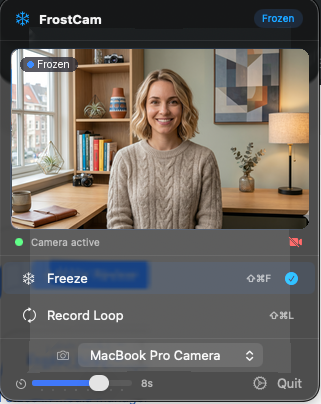
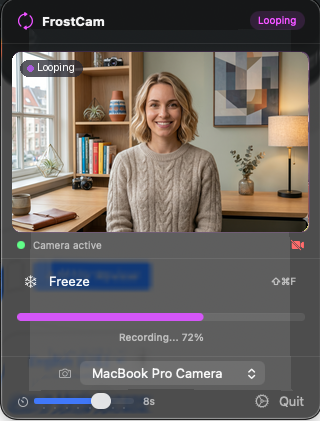
Install the extension
One click on first launch, one approval in System Settings. FrostCam becomes a system camera device.
Pick FrostCam as your camera
In Zoom, Meet, Teams or anything else with a camera picker. Your real webcam still feeds it.
Hit the shortcut
Global hotkeys work without leaving the call window. Nothing on screen gives it away.
Why not just turn the camera off?
You can. But meetings get weird when one tile goes black mid-conversation, and turning it back on makes everyone look up.
A frozen frame keeps the rhythm of the call. It looks like you got still, not like you left. People don't notice — which is the point.
Loop mode is for the longer step-aways: when you need to nod along to a status update while you do something else for a minute.
It can't leak your feed, because it can't reach the network.
Frames are processed on your Mac and handed straight to the virtual camera. There's no account, no telemetry, and no network entitlement in the app at all — the only connection macOS permits is Apple's own purchase flow.
Read the privacy policy →Pay once. Or just don't.
Both modes work on the free tier. Pro removes the watermark — that's the deal.
Free
Pro
Pro+
Purchases handled by Apple · refunds via reportaproblem.apple.com within 90 days
Common questions
Which apps does it work with?
Any macOS app that uses the system camera framework. Tested with Zoom, Google Meet, Microsoft Teams, FaceTime, Slack, Discord, Webex, Photo Booth, OBS, and many more. If the app shows a camera picker, FrostCam appears in it.
Does it record me?
No. Loop mode keeps a few seconds of frames in memory while it plays back, then discards them. Nothing is written to disk and nothing is sent anywhere.
Why is there a watermark on the free version?
It's how the free tier supports the paid tier. The watermark is small and only shows on the virtual camera output, not your real webcam. Pro removes it.
What about Windows or Linux?
FrostCam is macOS only and there are no plans to port. The Camera Extension architecture it's built on is Apple-specific.
Will Pro+ ever get exclusive features?
No. Pro and Pro+ unlock exactly the same things. Pro+ exists for people who want to support indie development at a higher price — like a tip jar with a supporter framing. Don't buy it expecting more functionality.
How does FrostCam compare to FreezingCam?
Both are Camera Extensions and both freeze and loop your webcam. FreezingCam is a $39/year subscription bought directly, and also does a fake bad-connection effect that FrostCam deliberately doesn't. FrostCam is a free tier or $14.99 once on the App Store, and ships with no network entitlement at all. Full comparison.
How do refunds work?
Refunds are handled by Apple. Visit reportaproblem.apple.com within 90 days of purchase to request one.
Do I need to restart after installing?
Only after an update that replaces the camera extension — macOS defers tearing down the old version, so the virtual camera reappears in your call apps after a restart. FrostCam tells you when that's the case.